My AI CRM Handled Over 10,300 People. The Secret: Knowing When to Stay Quiet
WhatsApp, Instagram, Facebook and web chat on a single board, with an AI assistant that replies, knows when to stay quiet and hands the conversation to a person at exactly the right moment. Stages, technologies and how it works inside.

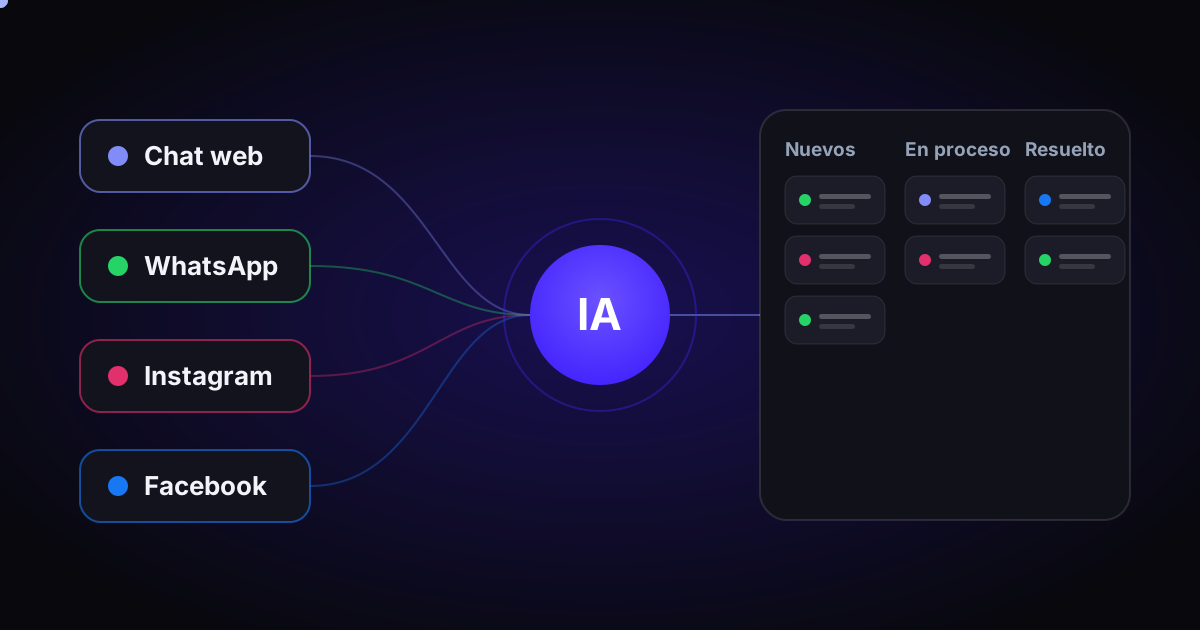
A busy Chilean eCommerce store was getting messages from five directions: web chat, WhatsApp, Instagram direct messages, and Instagram and Facebook comments. Each channel lived in its own app, with its own inbox and no memory of what had happened in the others.
The result was the usual: late replies, customers asking the same thing twice, complaints nobody saw in time, and sales lost after hours. The team wasn't short on effort. It was missing a place where everything could be seen together.
So I built one. A custom omnichannel CRM, with an AI assistant that answers the day-to-day questions and a system that decides, conversation by conversation, when the bot should reply and when a person should.
The stages
It didn't start as a CRM. It started as an AI chat on the website and grew as each piece proved it worked. That order mattered: each stage built on the previous one, and nothing was built "just in case."
- AI assistant on the web. A chat that replies live, knows the catalog with real stock and prices, recommends products and checks the status of an order.
- The CRM and its board. A custom data model (contacts, per-channel identities, conversations, messages and events) and a kanban board for the team. The web chat started showing up there.
- WhatsApp. Connection to the official WhatsApp Cloud API: receive, reply, send files and respect the 24-hour window.
- Instagram and Facebook. Direct messages, story replies, mentions, and comments on posts and ads.
- AI router and handoff. The most delicate piece: deciding who replies and, above all, when the bot should stay quiet.
- Automations. Shipping notices over WhatsApp, re-engagement of customers outside the 24-hour window, and measurement of the sales that pass through a conversation.
The architecture
The most important decision was where the CRM lives. Instead of an external service that had to sync with the store, I built it as a plugin inside the same eCommerce CMS. That way the CRM reads orders, customers, stock and shipments firsthand, with no copies and no fragile integrations.
The dashboard the team uses is a separate app, built in React and served from a subdomain. It talks to the CRM through a REST API protected by a token, without touching the store's login.
The journey of a message
When a customer writes on WhatsApp or Instagram, Meta notifies the CRM with a webhook. What happens next is designed for two things: never lose a message and never reply more than needed.
Two details make the difference. The first: every webhook is verified with its signature; if the signature doesn't match, the message doesn't get in. An unverified webhook is an open door for injecting fake messages and burning through the AI budget. The second: the CRM answers Meta in milliseconds and leaves the heavy work (classifying, drafting, downloading files) in a background queue. That way no slow process blocks the others.
And since Meta sometimes resends the same notification, each message is stored only once, and the bot acts only if the customer's last message is still unanswered.
One brain for all channels
The assistant that replies on WhatsApp and Instagram is exactly the same one as on the web. There aren't three bots with three personalities: there's one business prompt, a live catalog and an after-sales protocol, shared across all channels.
The only thing that changes per channel is a final layer of rules. In messaging, for example, the assistant replies with text and links only (there are no "add to cart" buttons), never sends the customer to another channel and, when asked about an order, checks the real status in the store. It never makes up a status or a tracking number.
That separation makes maintenance simple: if a policy changes, you change it in one place and every channel learns it.
The router: does the bot reply, or a person?
Before the assistant writes anything, a router classifies the conversation. It works in two layers: first, keyword rules, fast and free; if a rule is clear, the AI isn't even consulted. Then, an AI classifier that returns, in JSON, the category, the customer's mood, the urgency and how confident it is.
Rules always override the AI. And the router only escalates: it can move a conversation from the bot to a person, but never the other way around. A complaint, an order that never arrived, a refund or a change of details always ends up in human hands.
Escalation comes in two intensities. In the softone, the bot delivers its reply and the conversation is flagged for a person to follow up. In the hardone, the bot sends a single "a person will reply to you shortly" message and steps away.
Knowing when to stay quiet
This took the most work, and it's where I learned the most in production. A bot that answers well is easy. A bot that knows when not to answer is something else.
The real problem: the team often replies directly from the WhatsApp or Instagram app on their phone, not from the CRM. If the bot doesn't find out, it talks over the person. The solution has several layers:
- A per-conversation switch ("Handled by: Bot / Human") that is the source of truth. On Human, the bot doesn't write.
- A 60-second wait before replying. It gives time for the echo of an agent's message sent from the phone to arrive, and it groups into a single reply the messages the customer sends in a row.
- 24 hours of silence if the conversation has an assigned owner or a person replied recently. After that time, the bot takes over again, so no thread stays mute forever.
- Stages that are human territory: if the conversation is in Escalated or In progress, the bot stays out.
- On resolve, the bot comes back for the next contact, unless a person handled it in the last 72 hours.
The team board
All of this shows up on a kanban board. Each conversation is a card that moves through columns: New, Escalated, In progress, Waiting on customer and Resolved, plus a Shipments column for shipping notices. Columns can be renamed and new ones can be created.
Inside each conversation the team has what it needs to work without leaving the dashboard:
- Unified customer history across all channels, linked to their account and orders in the store.
- Bot / Human switch, automatically assigned owner and a record of who wrote each message.
- AI draft button: the assistant proposes a reply and the person decides whether to send it.
- Internal notes, color-coded tags, quick replies and attachments.
- Reply to and moderation of Instagram and Facebook comments (reply, hide or delete).
- Re-engagement outside the 24-hour window with approved templates, with a warning that the send has a cost.
- Desktop notifications, dark mode, user management with permissions and CSV export.
Automations that work on their own
Shipping notice
When an order changes to "Shipped," the CRM looks up the tracking number and sends the customer a Meta-approved WhatsApp template, with a button to track their order. If the order ships from two warehouses, one notice is sent per tracking guide. There are retries in case the guide is uploaded late, and a log that prevents notifying the same thing twice.
Those conversations stay in the Shipments column so they don't clutter New. If the customer replies, the card goes back to New and is handled like any other.
Sales attribution
The question every owner asks: does the assistant sell, or does it just chat? The CRM matches store orders against earlier conversations: by phone number on WhatsApp, by customer account on the web chat, and by use of the coupon the assistant hands out.
Security
A CRM that talks to customers and reads orders has to take care of several things:
- Every webhook is verified with its signature; without the configured key, the channel refuses to process.
- Each channel's credentials are stored encrypted and never shown in the dashboard.
- Dashboard access by token, with roles and per-user permissions; an access can be paused in one click.
- Rate limits against abuse and email verification before showing any order data.
- The assistant only resends a password to the email of the account tied to that phone number, never to one the customer types in.
The stack
The store's eCommerce CMS as the base, a custom plugin for the CRM, a React dashboard, Meta's official APIs for WhatsApp, Instagram and Facebook, and language models to draft and classify. Nothing exotic: proven pieces, well connected.
What I take away
The AI was the easy part. The hard part was everything around it: not losing a message, not replying twice, not jumping in when a person is already handling it, and never making up a fact. An assistant becomes useful when the team trusts it, and that trust is earned with clear rules, not with a longer prompt.
Want something like this in your company? Check out the AI consulting.
Contact me